Ultimate Mega 100 Vase Pack 3D Models for 3D Printing
Transforming a blank desk, a barren shelf, or a dull corner of your living room into a curated gallery space doesn’t require expensive art commissions. It requires the right digital assets and a bit of technical know-how. The Ultimate Mega 100 Vase Pack 3D Models for 3D Printing offers a comprehensive solution for creators looking to elevate their physical output with over one hundred unique, artistic designs. Developed over an entire year, this collection is not merely a random assortment of shapes; it is a structured library designed to accommodate everything from minimalist geometric planters to complex, high-detail sculptural vases.
Whether you are a hobbyist experimenting with your first print or a professional designer seeking inspiration for client projects, understanding the nuances of this pack can mean the difference between a flawless centerpiece and a failed print job. This guide explores what makes this collection valuable, the common pitfalls users encounter when printing these intricate models, and how to ensure your results match the stunning previews.
Understanding the Diversity of the Collection
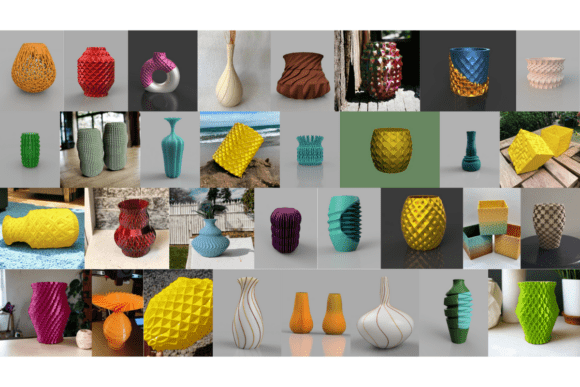
One of the primary reasons users gravitate toward the Ultimate Mega Vase Pack 100 Artistic Geometric STL Collection is its sheer variety. A single pack that covers multiple aesthetic styles allows for greater creative flexibility without needing to source files from disparate websites. The collection is broadly categorized into four distinct style groups, each requiring different printing strategies.
- Geometric Voronoi: These designs feature intricate patterns, such as yellow honeycomb lattices and faceted prism structures. They rely on precise wall thicknesses and clean angles.
- Organic Flowing: Characterized by smooth, twisted silhouettes and coral-like perforated structures, these models demand careful orientation to maintain structural integrity during printing.
- Modern Architectural: Sharp angles, tiered cubes, and sleek, elongated bottle shapes define this category. They often serve well in modern office decor where clean lines are prioritized.
- Textured Tactile: For those who want to engage the sense of touch, these vases feature “spiked” protrusions, woven textures, and deep-ribbed patterns.
Recognizing which category a specific model falls into is the first step in preparing your slicer settings correctly. Treating a delicate organic vase with the same parameters as a sturdy architectural block will likely result in poor surface quality or structural failure.
Common Mistakes When Printing Complex Vases
While the promise of "vase mode" friendly models is appealing, not every file in the Ultimate Mega 100 Vase Pack behaves simply. Many users rush into printing without adjusting their slicer profiles, leading to frustration. Here are the most frequent errors observed when working with this type of dense, multi-style collection.
Ignoring Slicer Warnings and Geometry Errors
A critical instruction provided with the pack is to ignore slicer warnings. If your slicing software displays errors regarding non-manifold geometry or self-intersections, do not assume the file is corrupted. In many cases, these warnings are an intentional part of the design, particularly in the Organic Flowing and Geometric Voronoi sections. Designers often use overlapping vertices to create seamless visual effects that standard validation tools flag as errors.
The Better Approach: Instead of trying to repair the mesh using external software—which can ruin the delicate details—trust the author’s guidance. Most modern slicers can handle these minor geometric quirks if the layer height and wall count are set appropriately. Proceed with the print after verifying that the visual preview looks correct.
Misjudging Scale and Build Plate Constraints
Vases in this pack vary significantly in size. A common mistake is assuming that because a model fits on the screen, it will fit on your printer’s build plate. Scaling a vase down too much can make fine lattice structures disappear entirely, while scaling up too much may exceed your printer’s Z-axis height.
The Better Approach: Always check the dimensions of the original STL file before importing it into your slicer. Use the scale tool to resize the model to fit your specific decorative needs or build volume. Remember that aspect ratio matters; stretching a short, wide planter into a tall vase will distort the texture and potentially cause collapse.
Overlooking Multi-Material Potential
Many models in the Ultimate Mega 100 Vase Pack are shown with gradients or dual-color finishes in promotional images. Beginners often print these in a single color and feel disappointed that the result lacks the vibrancy of the preview. However, these designs are frequently optimized for multi-material printers or rainbow filaments.
The Better Approach: If you have a dual-extruder printer, consider pairing contrasting colors for the Geometric Voronoi designs to highlight the lattice work. If you only have a single extruder, invest in a high-quality gradient filament (rainbow PLA or PETG). The twisted silhouettes of the Organic Flowing vases will catch the light beautifully as the color shifts, creating a dynamic effect that solid colors cannot replicate.
Technical Specifications and Best Practices
To get the most out of the Ultimate Mega 100 Vase Pack 3D Models for 3D Printing, you must align your printing technique with the complexity of the model. The pack includes designs ranging from easy-to-print vase mode compatible files to highly complex experimental geometries.
Selecting the Right Print Mode
For the simpler Modern Architectural and Textured Tactile vases, standard wall-perimeter prints work well. However, for the intricate Geometric Voronoi and Organic Flowing designs, vase mode (spiral vase) is often recommended. This mode prints a continuous spiral, eliminating seams and reducing print time significantly. It also reduces the amount of support material needed, which is crucial for porous structures.
Caution: Not all files in the pack support vase mode perfectly due to their complex internal structures. Always enable "Spiralize Outer Contour" only after checking the model’s base and top closure. If the model has a closed bottom and top, vase mode may not be suitable, and you should revert to standard layer-by-layer printing with appropriate infill.
Material Selection Matters
The tactile nature of some vases means that material choice affects both aesthetics and durability. PLA is excellent for detailed geometric prints due to its sharp detail retention, but it can become brittle. For larger, floor-standing vases intended for outdoor garden use, PETG or ABS is preferable due to their heat resistance and flexibility.
Furthermore, the "spiked" protrusions on textured vases can be fragile. Using a slightly higher nozzle temperature and slower print speed can help fuse these small details more securely to the main body, preventing them from snapping off during post-processing or handling.
Evaluating Your Final Output
After the print completes, take a moment to inspect the result. Look for signs of stringing in the lattice areas or warping at the base. If you encounter issues, refer back to the specific style category of the vase. Did you use the wrong orientation? Was the cooling sufficient for the thin walls?
The Ultimate Mega Vase Pack 100 Artistic Geometric STL Collection is a powerful tool for enhancing your 3D printing portfolio. By avoiding common pitfalls like ignoring intentional geometry warnings, misjudging scale, and neglecting material properties, you can produce stunning, professional-grade decor. Treat each model as a unique challenge, adjust your settings accordingly, and you will find that this mega pack provides a diverse library of models for every level of expertise.